
Credential Stuffing and AntiPublic Checkers: What Security Professionals Need to Know
Credential stuffing attacks are responsible for billions of dollars in fraud annually. Understanding how these attacks work — and how antipublic checkers help both attackers and defenders — is essential knowledge for modern security professionals.
Every major data breach adds millions of username and password combinations to the underground economy. Attackers collect these credentials into massive lists called "combo lists" and use them to break into accounts across the internet. This technique, known as credential stuffing, exploits a simple human weakness: password reuse.
What is Credential Stuffing?
Credential stuffing is an automated attack where stolen username/password pairs from one breach are tested against other websites and services. Unlike brute force attacks that guess passwords, credential stuffing uses real credentials that users have actually used — just on different sites.
The attack works because people reuse passwords. Studies consistently show that over 60% of users use the same password across multiple accounts. When one site gets breached, attackers can access dozens of other accounts belonging to the same user.
The Attack Flow
Step 1: Attacker obtains combo list from a data breach or underground marketStep 2: Automated tools test credentials against target websitesStep 3: Successful logins are flagged as "hits"Step 4: Compromised accounts are exploited or sold
The Scale of Leaked Credentials in 2026
The numbers are staggering. Data breaches have exposed billions of credentials, and the problem continues to grow every year.
32+ billion email:password combinations circulating in known databases24+ billion credentials exposed in 2024 alone (Source: various breach trackers)80%+ of hacking-related breaches involve stolen or weak credentials$6+ billion in annual losses attributed to credential stuffing attacks
Major breaches from companies like LinkedIn, Adobe, Dropbox, and countless others have contributed to this massive pool of exposed credentials. Even breaches from years ago remain valuable because many users never change their passwords.
Understanding Combo Lists
A combo list (or combolist) is simply a text file containing username:password or email:password pairs, typically one per line. These lists are the ammunition for credential stuffing attacks.
Combo List Format
user@email.com:password123john.doe@company.org:Summer2024!admin@website.net:qwertyjane_smith@mail.com:letmein
Where Combo Lists Come From
Data breaches - Direct database dumps from hacked companiesPhishing campaigns - Credentials harvested from fake login pagesMalware logs - Keyloggers and info-stealers on infected machinesPrevious attacks - "Hits" from earlier credential stuffing campaignsDark web markets - Purchased from underground vendors
What Are AntiPublic Checkers?
An antipublic checker is a tool that compares credentials against known public databases to determine if they've been previously leaked. The term "antipublic" refers to filtering out credentials that are already publicly known, leaving only "private" (previously unknown) lines.
How They Work
AntiPublic checkers maintain massive databases of known leaked credentials. When you submit a list for checking, each line is compared against this database:
Public lines - Credentials found in the database (already leaked)Private lines - Credentials NOT in the database (potentially unique)
The Output
After processing, an antipublic checker typically outputs two files:
public.txt - Lines that match known breachesprivate.txt - Lines not found in the database
The Dual Nature: Offensive vs Defensive Use
AntiPublic checkers are classic dual-use tools. The same technology that helps attackers filter their stolen credentials also helps defenders protect their organizations. Understanding both perspectives is crucial.
Offensive Use Cases (Red Team / Threat Actors)
From an attacker's perspective, antipublic checking is about efficiency and value:
Filtering fresh credentials - Private lines are more likely to still be validValuing combo lists - Lists with high private ratios sell for moreAvoiding burned credentials - Public credentials may trigger security alertsPrioritizing attack targets - Focus on credentials not yet exploited
Defensive Use Cases (Blue Team / Security Researchers)
For defenders, antipublic checkers serve equally important purposes:
Employee credential monitoring - Check if corporate credentials appear in breachesBreach impact assessment - Determine if your organization's data is circulatingPassword policy validation - Identify employees using known-compromised passwordsThreat intelligence - Understand what credentials attackers might havePenetration testing - Validate credential exposure during security assessments
Public vs Private: Why It Matters
The distinction between public and private credentials has significant implications for both attackers and defenders.
For Attackers
Private credentials are more valuable because:
They're less likely to have been used in previous attacksUsers haven't been notified to change these passwords yetSecurity systems may not have flagged these specific credentialsHigher success rates in credential stuffing campaigns
For Defenders
The public/private distinction helps prioritize response:
Public credentials require immediate password resetsPrivate credentials in your possession may indicate an insider threatTracking when credentials go from private to public helps gauge breach freshnessUnderstanding exposure scope helps measure risk accurately
URL AntiPublic: Beyond Email:Password
Modern antipublic checkers don't just handle email:password combinations. URL antipublic checking compares discovered vulnerable URLs against known databases of previously exploited sites.
Input: List of potentially vulnerable URLs (from Google dorking, scanning)Output: URLs not previously seen in breach databasesValue: Focus on fresh, unexploited targets rather than already-compromised sites
This is particularly useful for pentesters who want to avoid testing sites that have already been reported and patched, focusing instead on genuinely undiscovered vulnerabilities.
Speed Matters: Processing Millions of Lines
When dealing with combo lists containing millions or billions of lines, processing speed becomes critical. A slow checker can take days to process what a fast one handles in minutes.
Speed Comparison
ToolSpeed1M LinesBasic web checkers10-50 lines/sec5-27 hoursDesktop tools100-500 lines/sec30 min - 2.7 hoursProfessional checkers1,000-2,000 lines/sec8-16 minutesAPlus5,000-10,000 lines/sec1.5-3 minutes
At enterprise scale, this speed difference translates to significant time and cost savings. Processing a 100 million line combo list at 50 lines/second would take 23 days — at 10,000 lines/second, it takes under 3 hours.
APlus: The Fastest AntiPublic Checker
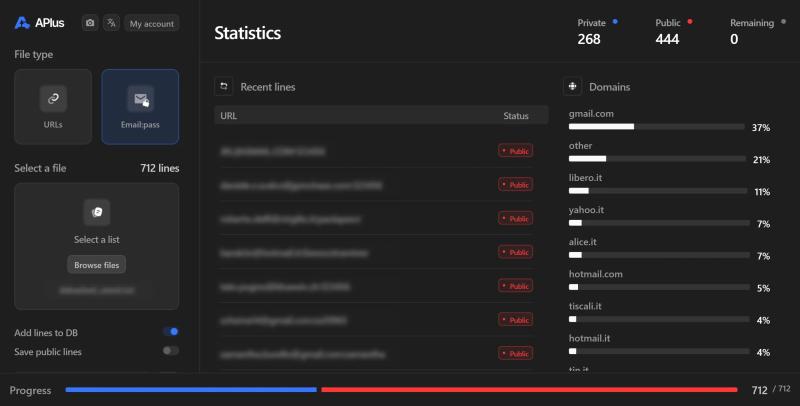
APlus is our dedicated antipublic checker built for speed and scale. Whether you're a security researcher monitoring corporate exposure or a pentester validating credential findings, APlus processes your lists faster than any alternative.
32B+ email:password records - One of the largest credential databases180M+ URLs - Comprehensive URL antipublic checking5,000-10,000 lines/second - The fastest checker on the marketPrivacy-focused - All data stored as hashes, not plaintextClean output - Separate public and private results instantlyAffordable pricing - Starting at just $15/month
Stop wasting hours on slow checkers. APlus processes what others take days to complete in just minutes, letting you focus on analysis rather than waiting.
Protecting Your Organization from Credential Stuffing
Understanding credential stuffing is the first step to defending against it. Here are practical measures every organization should implement:
Technical Controls
Multi-factor authentication (MFA) - Makes stolen passwords alone insufficientRate limiting - Slow down automated login attemptsCAPTCHA challenges - Block automated bots at login pagesIP reputation blocking - Block known malicious IP rangesDevice fingerprinting - Detect suspicious login patterns
Monitoring and Response
Credential monitoring services - Get alerted when employee credentials appear in breachesLogin anomaly detection - Flag unusual login locations or timesFailed login monitoring - Detect credential stuffing attempts in progressRegular credential audits - Proactively check employee credentials against breach databases
User Education
Password manager adoption - Enable unique passwords for every accountPassword reuse awareness - Train users on the risks of reusing passwordsBreach notification response - Teach users to change passwords immediately after breaches
For Penetration Testers: Credential Workflow
When conducting authorized security assessments, here's how to effectively use antipublic checking in your workflow:
Step 1: Gather target email domains from OSINTStep 2: Search breach databases for credentials matching target domainsStep 3: Run findings through antipublic checker to assess exposureStep 4: Test valid-looking credentials against target systems (with authorization)Step 5: Document findings for the security report
This approach demonstrates real-world attack scenarios and helps clients understand their actual exposure to credential-based attacks.
Conclusion
Credential stuffing remains one of the most prevalent and damaging attack techniques in 2026. As long as users reuse passwords and breaches continue to occur, attackers will exploit this vulnerability.
AntiPublic checkers serve as essential tools for both sides of the security equation. For defenders, they enable proactive monitoring and breach response. For pentesters, they help demonstrate real-world attack scenarios and validate security controls.
Whether you're protecting an organization or conducting authorized security assessments, understanding how these tools work — and having access to fast, comprehensive checkers like APlus — is essential for modern security work.
Shop nowThe blog posts on this website are fictional and theoretical. They exist for educational purposes only and should never be treated as instructions to perform illegal or unauthorized activities.
The scenarios described are hypothetical and do not promote or encourage malicious or harmful actions. They reflect a professional penetration tester's perspective, assuming proper permission and legal authorization to test a website, company, or network.
Our posts are not a call to action, and we do not condone illegal activity. Readers are responsible for complying with applicable laws and regulations.
By reading our posts, you acknowledge these terms. If you are not a professional or authorized individual, do not attempt to replicate any techniques described here.
Our content is for education only, and we strongly advise against using any information or techniques for malicious purposes.
Read next

Web Crawler vs Search Engine Scraper: Which One Should You Use?

Google Dorks for OSINT: An Advanced Research Guide

SQL Injection Methods Explained: Time, Boolean, Error, Union and More
MD5, SHA1, SHA256 Hash Cracking: Complete Guide for Pentesters

Google Dork Operators Cheat Sheet 2026: The Complete Guide

Is Google Dorking And SQLi Dead In 2026?

DorkPlus has been around for over three years. It started as a Google proxyless scraper and grew into an all-in-one pentesting solution, evolving week after week.
Copyright © 2026 DorkPlus
All systems operational