
Google Dork Operators Cheat Sheet 2026: The Complete Guide
Master every Google dork operator with this comprehensive cheat sheet. From basic operators like site: and inurl: to advanced combinations, this guide covers everything pentesters and security researchers need to find vulnerable targets efficiently.

- Google dorking (also known as Google hacking) is the practice of using advanced search operators to find information that isn't easily accessible through normal searches. For penetration testers and bug bounty hunters, mastering these operators is essential for reconnaissance and discovering vulnerable targets at scale.
What Are Google Dork Operators?
Google dork operators are special commands you can use in Google Search to filter and refine results. While regular users might search for "login page," a pentester would use operators like inurl:login.php to find specific login pages that might be vulnerable to attack.
These operators have been around since Google's early days, but they remain incredibly powerful in 2026. The key is knowing which operators to use and how to combine them effectively.
Basic Operators: The Foundation
Let's start with the fundamental operators every security researcher must know. These form the building blocks of more complex dork queries.
site:
Restricts results to a specific domain or subdomain. This is essential for scoping your searches to authorized targets.
site:example.com - All indexed pages from example.comsite:*.example.com - All subdomains of example.comsite:.gov - All government domainssite:.edu - All educational institutions
inurl:
Searches for pages with specific text in the URL. This is one of the most powerful operators for finding vulnerable endpoints.
inurl:admin - URLs containing "admin"inurl:login.php - PHP login pagesinurl:id= - URLs with ID parameters (potential SQLi)inurl:page= - URLs with page parameters (potential LFI)
intitle:
Finds pages with specific text in the HTML title tag. Useful for finding admin panels, dashboards, and specific applications.
intitle:"admin login" - Pages titled "admin login"intitle:"index of" - Directory listingsintitle:"dashboard" - Dashboard pagesintitle:"phpMyAdmin" - phpMyAdmin installations
intext:
Searches for specific text within the body content of pages. Great for finding error messages, sensitive information, or specific technologies.
intext:"sql syntax error" - SQL error messagesintext:"mysql_fetch_array" - PHP MySQL errorsintext:"Warning: include" - PHP include warningsintext:"DB_PASSWORD" - Exposed database credentials
filetype: / ext:
Filters results by file extension. Essential for finding configuration files, backups, and sensitive documents.
filetype:sql - SQL database dumpsfiletype:env - Environment configuration filesfiletype:log - Log filesfiletype:bak - Backup filesfiletype:conf - Configuration filesext:php - PHP files (alternative to filetype:)
Advanced Operators: Level Up Your Dorking
These operators are less commonly used but can be incredibly powerful for specific reconnaissance tasks.
allinurl:
Similar to inurl: but requires ALL specified words to appear in the URL. More restrictive but more precise.
allinurl:admin login - URLs containing both "admin" AND "login"
allintitle:
Requires all specified words to appear in the page title.
allintitle:admin panel login - Titles with all three words
allintext:
Requires all words to appear in the page body content.
allintext:username password login - Pages with all three terms
cache:
Shows Google's cached version of a page. Useful for viewing content that may have been removed or changed.
cache:example.com - Cached version of the site
related:
Finds websites similar to the specified domain. Good for expanding your target scope to similar technologies.
related:wordpress.org - Sites similar to WordPress
info:
Shows information Google has about a specific URL.
info:example.com - Information about the domain
define:
Returns definitions. Less useful for security but good for understanding technical terminology.
define:SQL injection - Definition of SQL injection
Boolean Operators: Combining Power
Boolean operators allow you to combine multiple search terms and operators for highly targeted queries.
AND (space or &)
Requires both terms to be present. In Google, a space between terms implies AND.
inurl:admin inurl:login - URLs with both admin AND login
OR (|)
Returns results matching either term. Use the pipe symbol or the word OR.
inurl:admin | inurl:administrator - Either admin OR administratorfiletype:sql | filetype:db - SQL or DB files
NOT (-)
Excludes results containing the specified term. Essential for filtering out false positives.
inurl:admin -site:github.com - Admin pages, excluding GitHubintitle:login -intitle:demo - Login pages, excluding demos
Exact Match ("")
Quotes force exact phrase matching. Critical for finding specific error messages or strings.
intext:"mysql_fetch_array()" - Exact PHP function"You have an error in your SQL syntax" - Exact MySQL error
Wildcard (*)
The asterisk acts as a placeholder for any word or phrase.
"admin * login" - admin [anything] logininurl:*admin*.php - PHP files with admin anywhere in name
Number Range (..)
Search within a range of numbers. Useful for finding files from specific years or version numbers.
"copyright 2020..2026" - Sites with recent copyright dates
Powerful Dork Combinations for Pentesters
Here are battle-tested dork combinations that security researchers use to find vulnerable targets. Remember: only use these on systems you have authorization to test.
Finding SQL Injection Targets
inurl:id= intext:"sql syntax"inurl:product.php?id= site:.cominurl:category.php?id= -site:github.comintext:"mysql_num_rows" filetype:php
Finding Login Panels
intitle:"admin login" inurl:admininurl:/wp-admin/ intitle:"log in"inurl:administrator/index.phpintitle:"cPanel Login" | intitle:"WHM Login"
Finding Exposed Files
intitle:"index of" "backup.sql"filetype:env "DB_PASSWORD"filetype:log intext:passwordintitle:"index of" "config.php"
Finding Vulnerable CMS Installations
inurl:/wp-content/plugins/ site:.cominurl:com_content inurl:view=articleinurl:/modules/ inurl:node site:.org
Finding LFI/RFI Targets
inurl:page= | inurl:file= | inurl:include=inurl:read.php?file=intext:"Warning: include" intext:"failed to open stream"
Country and Language Targeting
Different countries and regions often have unique security landscapes. Here's how to target specific geographic areas.
Country Code TLDs
site:.br inurl:admin - Brazilian admin pagessite:.ru filetype:sql - Russian SQL filessite:.id inurl:id= - Indonesian sites with ID paramssite:.th intitle:login - Thai login pages
Non-English Error Messages
Searching for error messages in local languages uncovers targets that English-only researchers miss entirely.
intext:"erro de sintaxe SQL" - Portuguese SQL errorsintext:"erreur de syntaxe SQL" - French SQL errorsintext:"SQL-Syntaxfehler" - German SQL errors
Common Mistakes to Avoid
Even experienced researchers make these mistakes. Avoid them to get better results and stay efficient.
Using spaces in operators - Write inurl:admin not inurl: adminForgetting to exclude noise - Always use -site:github.com to filter out code repositoriesToo broad queries - Start specific, then broaden if neededNot using quotes for exact matches - Always quote error messagesIgnoring case variations - Try admin, Admin, ADMIN, administratorManual dorking at scale - Use automation tools for large dork lists
Quick Reference Table
Bookmark this table for quick reference during your reconnaissance sessions.
OperatorPurposeExamplesite:Limit to domainsite:example.cominurl:Search in URLinurl:adminintitle:Search in titleintitle:loginintext:Search in bodyintext:errorfiletype:Filter by extensionfiletype:sql-Exclude term-site:github.com|OR operatoradmin | administrator""Exact match"sql syntax error"*Wildcardadmin * panel..Number range2020..2026
Scale Your Dorking with DorkPlus
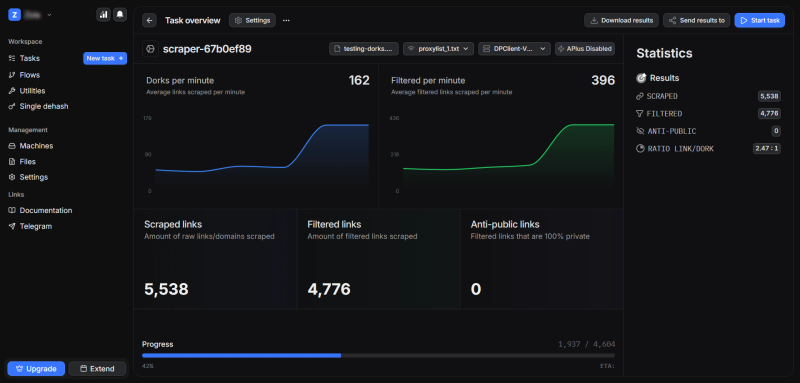
Manually entering dorks into Google is tedious and doesn't scale. Professional pentesters and bug bounty hunters use DorkPlus to automate the entire process.
Parse 10-20k dorks per minute - Test hundreds of creative dork variations in minutes10+ search engines - Google, Bing, Yahoo, Ask, T-Online, and moreBuilt-in dork generator - Create thousands of dork variations automaticallyIntegrated vulnerability scanner - Scan parsed results for SQL, XSS, LFI, RFI, ENVDatabase dumper - Extract data from confirmed vulnerable targetsCountry targeting - Filter results by geographic region
Stop copying dorks one by one. DorkPlus lets you focus on the creative strategy while handling the heavy lifting of parsing, scanning, and extraction.
Conclusion
Google dork operators remain one of the most powerful tools in a security researcher's arsenal in 2026. The key to success is understanding how each operator works and combining them creatively to find targets that others miss.
Start with the basic operators, practice combining them with Boolean logic, and develop your own niche-specific dorks based on your target industries and regions. Remember: the researchers finding the best targets in 2026 aren't using recycled dork lists — they're creating their own.
Whether you're doing bug bounty hunting, authorized penetration testing, or security research, mastering these operators will dramatically improve your reconnaissance efficiency and help you find vulnerabilities faster.
Shop nowThe blog posts on this website are fictional and theoretical. They exist for educational purposes only and should never be treated as instructions to perform illegal or unauthorized activities.
The scenarios described are hypothetical and do not promote or encourage malicious or harmful actions. They reflect a professional penetration tester's perspective, assuming proper permission and legal authorization to test a website, company, or network.
Our posts are not a call to action, and we do not condone illegal activity. Readers are responsible for complying with applicable laws and regulations.
By reading our posts, you acknowledge these terms. If you are not a professional or authorized individual, do not attempt to replicate any techniques described here.
Our content is for education only, and we strongly advise against using any information or techniques for malicious purposes.
Read next
Web Crawler vs Search Engine Scraper: Which One Should You Use?

Google Dorks for OSINT: An Advanced Research Guide
SQL Injection Methods Explained: Time, Boolean, Error, Union and More
MD5, SHA1, SHA256 Hash Cracking: Complete Guide for Pentesters
Credential Stuffing and AntiPublic Checkers: What Security Professionals Need to Know
Is Google Dorking And SQLi Dead In 2026?

DorkPlus has been around for over three years. It started as a Google proxyless scraper and grew into an all-in-one pentesting solution, evolving week after week.
Copyright © 2026 DorkPlus
All systems operational