
Google inurl: search generator
Create searches that focus on words found in page URLs. Combine inurl: with a domain, topic or date range for lawful research and site QA.
Build your query
Pre-built templates
0
Keywords
2
Active operators
1
Generated queries
Generated Google dorks
One query per keyword or phrase
site:example.com inurl:loginUse advanced search operators only for lawful research and systems you own or are explicitly authorized to assess. This builder formats queries; it does not grant permission to access indexed content.
Build URL-pattern searches without syntax errors
Place a route word or parameter pattern in inurl:, constrain it to an authorized site when appropriate and refine the output with the full query builder.
Core search operators
Combine site:, inurl:, intitle:, intext:, filetype: and exclusion operators with consistent quoting.
Date range filters
Add after: and before: dates to narrow indexed results to a useful research window.
Bulk keyword generation
Paste one keyword or phrase per line and produce a complete operator query for every entry.
Focused templates
Start with administration pages, configuration files, backups, parameters, login pages, directories or documents.
One-click copy and export
Copy the generated dorks together, download a TXT list or open one query in Google.
Local query building
Nothing is searched automatically. Your domains, niches and keywords stay inside the current browser tab.
Learn the operators behind your queries
A hand-picked reading list focused on Google dork syntax, combinations and responsible research.

Google Dork Operators Cheat Sheet 2026: The Complete Guide
Learn every core Google search operator with practical combinations and responsible-use examples.
Read guide
Is Google Dorking and SQLi Dead in 2026?
See how modern dorking workflows have evolved and why focused queries still matter.
Read guideA dork builder that never submits your queries
No account, no storage and no automatic Google request—only local query generation inside your own browser tab.

100%
Local generation
Domains, keywords and operators are combined by your browser. DorkPlus never receives the values you enter.
01
9
Operator controls
Build with keyword, site, URL, title, text, file type, exclusions and two date filters.
02
7
Ready-made templates
Use practical starting points, then refine every operator to match an authorized research scope.
03How to generate an inurl: query
Use inurl: when the URL itself is part of the research signal—for example, a documentation section, login route or public query-parameter pattern.
Enter a URL word or pattern
Add a route fragment such as docs, login or id= in the inurl field.
inurl:loginConstrain the website when possible
Replace example.com with a domain you own or are authorized to review to avoid an unnecessarily broad query.
Add context with keywords
Use descriptive terms, titles or exclusions to separate relevant pages from unrelated URL matches.
Review the final search
Copy the locally generated query or explicitly open it in Google after confirming the scope.
site:example.com inurl:loginURL search controls
A URL match describes text, not page behavior
An inurl: match means the indexed URL contains the requested term. It does not prove what the page does, whether it is accessible or whether it has a security issue.
Keep sensitive research within a documented scope and review search results as public discovery signals only. Never treat an indexed route as permission to access it.
- Use a narrow route fragment
- Add site: for authorized reviews
- Interpret matches before taking action
Responsible use cases
Site architecture review
Find selected public route patterns on a site you manage.
Documentation research
Locate docs, help or API paths within a domain.
Migration QA
Check for publicly indexed legacy route fragments.
OSINT discovery
Find relevant public pages through meaningful URL words.
Google inurl: questions
Answers about URL matching, parameters, site scoping and responsible use.
More free utilities

Google Dork Generator
Build advanced search queries from operators and templates
Google Site Search Generator
Build searches for one domain or URL prefix
Google Intitle Search Generator
Search for words and phrases in page titles

All free utilities
Browse every free DorkPlus tool that runs locally in your browser.

Ready to turn dorks into structured results?
Move from hand-built searches to high-volume, multi-engine parsing with the DorkPlus Scraper—then clean, categorize and process results in one workflow.
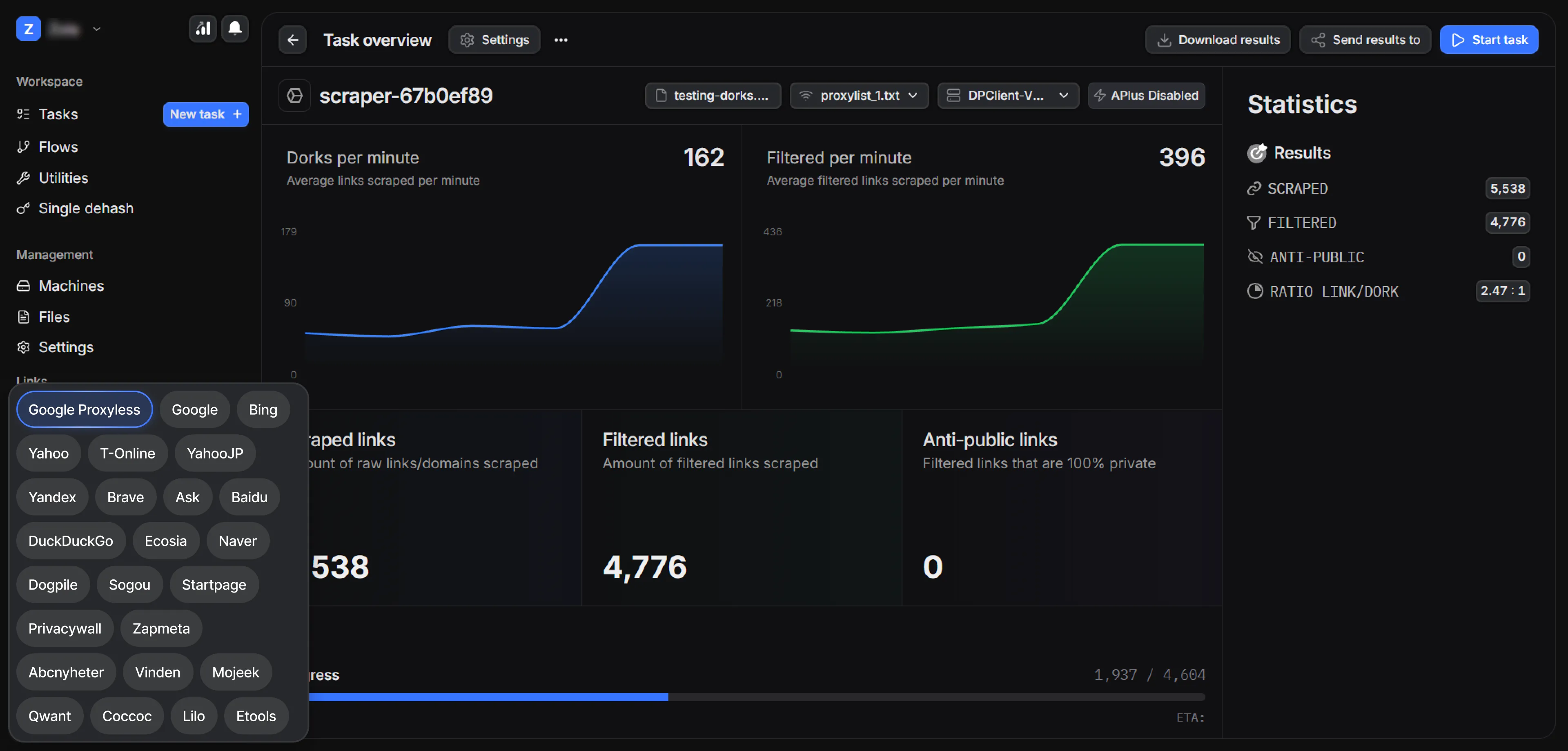


DorkPlus has been around for over three years. It started as a Google proxyless scraper and grew into an all-in-one pentesting solution, evolving week after week.
Copyright © 2026 DorkPlus
All systems operational